
<table align="center" cellpadding="10" cellspacing="0"
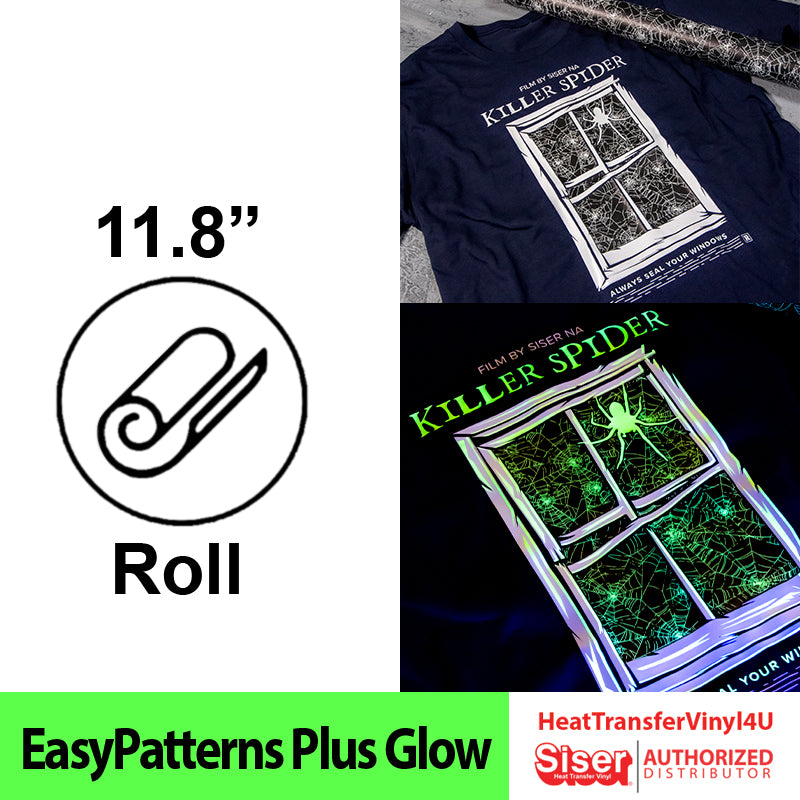
EasyPatterns® Plus Glow Heat Transfer Vinyl
It’s EasyPatterns Plus that now glow in the dark!
These pre-printed and pre-masked patterns will “charge” under light, and glow an eerie green in the dark! Just like other EasyPatterns Plus designs, EasyPatterns Plus Glow does not require a masking step. Simply cut designs mirrored carrier-side down just like any other HTV, weed away the excess material, and you’re ready to apply! EasyPatterns Plus Glow is a great way to achieve glowing, patterned designs with just a single piece of HTV. However, it is not recommended to layer additional HTV on top, as EasyPatterns Plus Glow should be used as a top layer only.
EasyPatterns are CPSIA Certified so you can decorate kids’ items with confidence.
<td
<table align="center" cellpadding="10" cellspacing="0"
PU composition • Pressure sensitive backing • Semi-gloss finish • 100 Microns/3.9 Mils
• 45°/60° blade
<table border="1"
Blade: 45°/60°
Gram Force: 5-10
Offset: .250
Speed: 10
<td style="text-align: center;" Cricut Explore Air:
Blade: AutoBlade, Standard
Setting: Iron-On
Blade: AutoBlade, Fine-Point
Setting: Heat Transfer, (Non-Cricut)
<td style="text-align: center;" Silhouette Cameo 4:
Blade: Standard, 3
Material: Heat Transfer, Smooth
Material: Smooth
Speed: 8
Force: 6
Blade: AutoBlade, 3
Cut Speed: 5
Half Cut: Auto
Blade: 45°
Gram Force: 80-90
Offset: .250
Speed: 25-50 cm/s
Blade: 45°
Gram Force: 9
Tool: CB09U+0
Speed: 25 cm/s
Blade: 45°/60°
Gram Force: 60-65
Speed: 300mm/s
*Blade Advancing Varies
Always perform a test cut prior to cutting designs.
<table align="center" cellpadding="10" cellspacing="0"
• Mirror design and cut according to your cutter’s settings
• Set iron dial between Cotton and Linen
• Cover with Heat Transfer Cover Sheet or Multipurpose Paper
• Place on flat, hard surface (ironing board not recommended)
• Press iron with medium/firm pressure (do not slide iron) for 15 seconds
• If areas of design lift after application, replace cover sheet
and re-press for 10 seconds
• Peel carrier hot or cold
<td style="text-align: left; padding-left: 30px;" Application Instructions (heat press)
• Cut material – MIRROR!
• Weed excess material
• Cover with Heat Transfer Cover Sheet or Multipurpose Paper
• Preheat garment for 2-3 seconds
• Apply design at 305°F/150°C
• Use medium pressure for 10-15 seconds
• Peel carrier hot or cold
<table align="center" cellpadding="10" cellspacing="0"
100% cotton
Poly/cotton blends
100% polyester
Leather
Siser Weeder
<td Laundering:
Wait 24 hours before 1st wash
Machine wash cold / mild detergent
Dry on normal dryer setting
Do not dry clean
Do not bleach
<table align="center" cellpadding="10" cellspacing="0"
<table align="center"
Be the first to review “Siser EasyPatterns Plus Glow 11.8″ Roll (Pre-Masked) Cheap Sale Big Sale”
Related products
Scrapbooking & Stamping
Pekingese Dog Breed Head Color ClipArt SVG From China Cheap Pice
Die-Cutting & Embossing
Die-Cutting & Embossing
Die-Cutting & Embossing
Die Cut Christmas Card Set – Christmas Bling Clearance Online Fake
Reviews
There are no reviews yet.